What Is Your Business Really Earning?
Our free SDE Calculator worksheet takes you from the profit on your tax return to Seller’s Discretionary Earnings in five steps.
Tells you which line of your return each number comes from
Adapts to an 1120-S, 1120, 1065 or Schedule C
Covers the add-backs buyers and lenders actually accept
Includes a worked example and a Check My Work tab
Follows the video walkthrough line by line
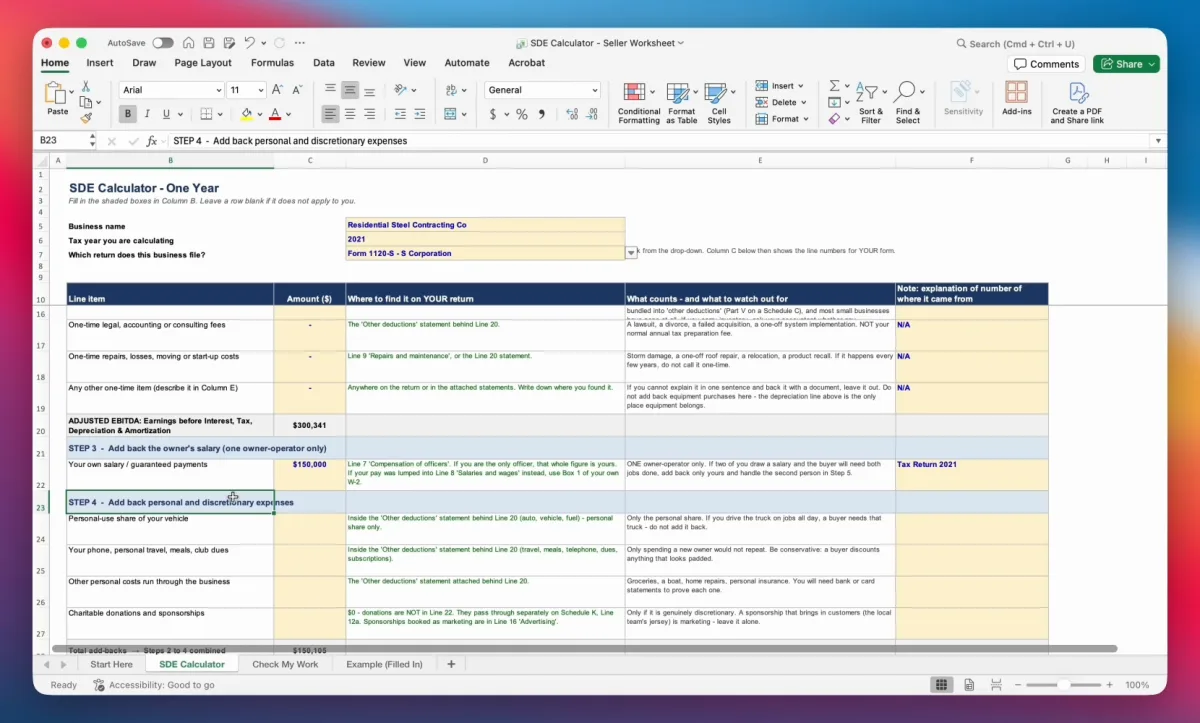
What the Worksheet Covers
Seller’s Discretionary Earnings is the number that drives your valuation, what buyers are willing to pay, and how much a bank will lend against your business. It starts from the profit on your tax return and adds back everything a new owner wouldn’t have to pay. The worksheet walks through that in five steps, with a column telling you exactly where to find each figure on your return.
- Start with the profit on your return. Revenue and ordinary business income, straight from the tax form.
- Calculate EBITDA. Add back interest, depreciation and amortization, and normalise any one-off, non-recurring expenses.
- Add back the owner’s salary. For one owner-operator only.
- Add back personal and discretionary expenses. Vehicles, phones, personal insurance, donations and the other items that live in the “other deductions” statement.
- Make arm’s-length adjustments. Unpaid family members, above- or below-market rent, and recurring costs missing from the return.
Every input cell is shaded yellow, the Check My Work tab flags anything missed, and the Example tab shows a completed sheet. In the video, a real contractor’s return goes from about $300,000 of reported profit to roughly $430,000 of SDE.
Want to See It Done on a Real Return?
The video walkthrough fills in this exact worksheet line by line from a redacted 2021 tax return. Or, if you’d rather talk it through, Sundance offers free, no-obligation valuations.